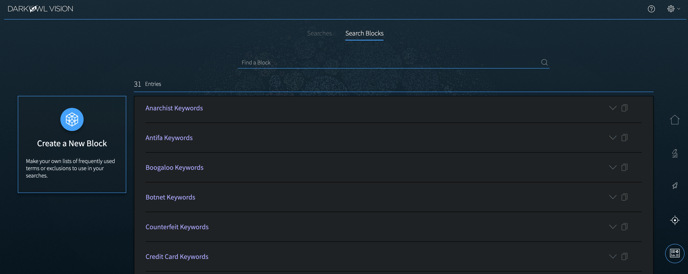
To create a Search Block, navigate to the Search Block library under the Tools option on the top navigation bar.
This page allows you to manage your Search Blocks library. Pre-built blocks include curated keyword lists, as well as blocks that help you exclude terms; any of these pre-built blocks can be modified to make a new customized Search Block with terms you select.
1. Click Create a New Block.
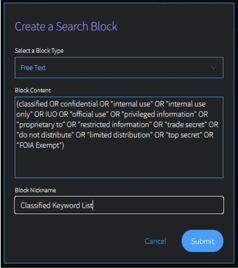
2. Open the Select a Block Type drop-down, and choose from: Free Text, Credit Cards, Cryptocurrencies, Chat Users, Domains, Emails, IP Addresses, or Social Security Numbers.
- Free Text accepts the same inputs and formatting (Booleans, operators, etc) as free text on the search bar.
- Credit Cards can be lists of individual credit card numbers or BINs. If entering BINs, use a trailing wildcard (*) after the first six numerical digits.
- Cryptocurrencies can be lists of cryptocurrency wallet addresses. Supported types include Bitcoin, Ethereum, Monero, Litecoin, Dash, ZCash.
- CVEs can be lists of full CVE-ID numbers, CVE-ID numbers, or CVE years.
- Source Domains allow you to filter to content from selected domains. Use the Free Text Block Type to search for domain mentions.
- Emails can be lists of email addresses, email domains (without the @ portion), or email subdomains.
- IPs can be lists of IP addresses. We support the following types: IPv4, IPv6/IPv6 compressed, CIDR ranges for both IPv4 and IPv6.
- Social Security Numbers should be input using hyphens (i.e. 123-45-6789).
- Website mentions can be a list of domains you wish to find mentioned within our data.
3. Next, input your desired Block Content.
4. Finally, give the Block a Nickname and click Submit.
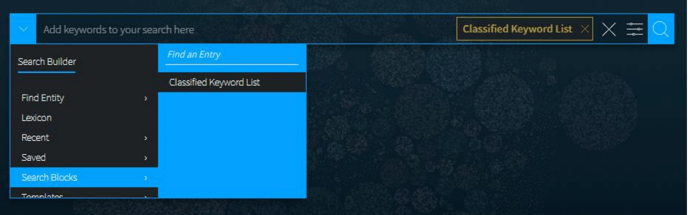
Once created, your block will now be accessible through the Search Tools > Search Blocks. Click on the block to add it to your query on the search bar.