The Market Explore page allows you to search for and view analytics and analyst-curated information about enhanced darknet marketplace dataset within DarkOwl's DarkMart data store. To look up a market, you can start typing center bar, or you can use the Filter options next to the Topics or Languages columns.
All Charts
The charts at the top of the page provide information about the enhanced market dataset overall, including volume of product listings and vendors, top shipping sources, as well as the markets and vendors that have the most listing volume. Clicking on View Charts will bring you to an expanded visualization section showing Enhanced Markets by Topic, New Listings Over Time, and Shipping Sources across the entire dataset.

Individual Markets
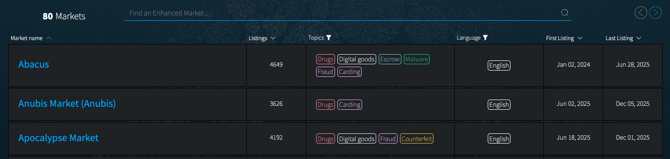
The table at the bottom of the page lists all enhanced markets within the DarkOwl dataset, sorted alphabetically. You can also sort the list by listing volume or first/last seen dates, or filter the list using the filter icons next to Topics or Languages column headings.
- Listings: total number of unique product listings for the market
- Topics: primary topic(s) the market is known for, as applied by DarkOwl analyst team
- Languages: primary language(s) used on the market, as applied by the DarkOwl analyst team
- First Seen: date/timestamp that DarkOwl collected the listing for the first time from the market
- Last Seen: date/timestamp that DarkOwl collected the most recent listing from the market
Clicking on an individual darknet marketplace on the table will bring you to the detail page for that market.
Overview
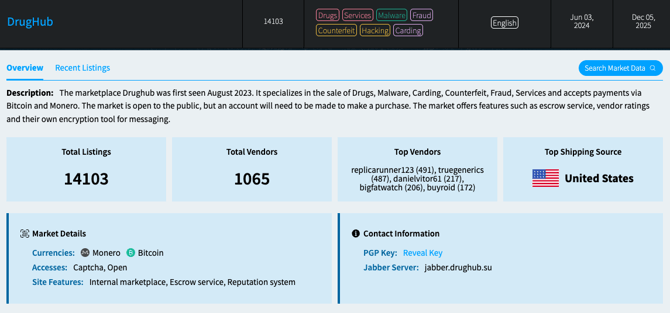
The Overview page includes metrics and summarization from our DarkMart enhanced market data store, including:
- Total Listings: number of unique product listings in the DarkOwl dataset.
- Total and Top Vendors: number of unique vendors on this market, as well as the top vendors by listing volume.
- Top Shipping Source: the country or region from which the most listings ship. If a market does not include ship from locations, or sells purely digital products, the box will display a message: “no known shipping sources.”
- New Listings Over Time: a visualization of new listings from the market, over time.
- Shipping Sources: a visualization of shipping sources, with concentration from red (most listings) to green (least listings). Click View All to see all countries and shipping areas with quantities by listing.
The Overview page may also include analyst-curated information, such as Description, Market Details (currencies accepted on the market, Admin handles, and more), or Contact Information (PGP key, emails, Jabber server, and more). If a PGP key is available, click Reveal Key to display and copy the key.
Click on Search Market Data to go to the Markets Research section, filtered to this market's listings.
Recent Listings
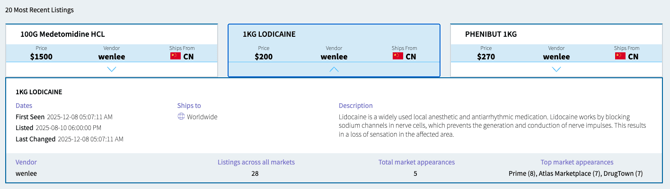
The Recent Listing page includes cards displaying the 20 most recent new listings discovered on the market. Each card includes the listing title, as well as price, vendor, and ship from locations (if available). Click on the down-arrow to expand the listing and see additional information, including Vendor information on the bottom of the panel.