
A Saved Search is simply a query you’d like to run again in the future. Once saved, you can find this list of searches on the Search Tools menu. Additionally, you can choose to Automate this search to apply monitoring functionality, which runs the search for you on a cadence you choose, generating Alerts on your dashboard if hits are found.
Saved Searches can be organized into Cases, which are a way to organize projects and work collaboratively in Vision UI. When monitoring is applied to a Saved Search in a Case, all subsequent Alerts will generate into that Case. The Tools: Saved Searches page includes Saved Searches not organized into a Case.
Creating a Saved Search
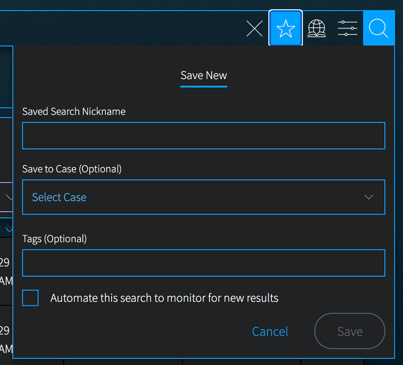
After you run a query in one of the Research sections, the Save Search icon (star icon) will appear on the right side of the search bar. Selecting that icon will open a form to set up your saved search.
-
Add a Saved Search Nickname.
-
Optionally, Save to Case to organize this search, and any alerts, into a Case. Select an existing Case name from the drop-down list. You can also create a new Case from the drop-down.
-
Optionally, add Tags, if desired. Tags can help you organize and sort your searches and their subsequent Alerts.
Continue with the steps below to Automate this search. If you don't want to add monitoring to this search, you can click Save now. The search will be set up for future use.
Applying Monitoring to generate Alerts
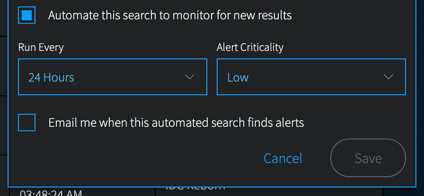
To apply monitoring, click Automate this search. This will open additional options:
-
Frequency: Select the automation frequency using the Run Every drop-down.
-
Criticality: Select an Alert Criticality for this search. Each Alert generated by this search will have this criticality applied.
-
Notifications: Opt to receive email notifications when Alerts are generated from this search using this box.
Click Save when complete. The Saved Search will appear in the Case you've selected, or the Tools: Saved Searches section.