
DarkOwl Vision UI offers an option to translate text on search or alert results into English.
Tip: You can translate multiple selections within a result.
To translate search result or alert result content, follow these steps:
- Highlight the portion of the result that you would like to translate.
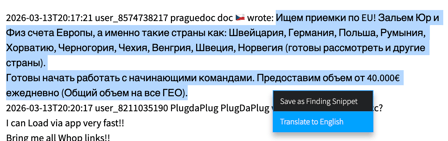
- Select Translate to English from the menu.
- The text will translate in place, in the result.
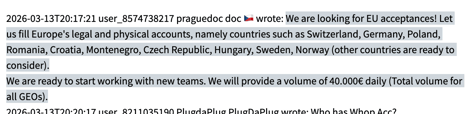
- Once the text is translated, a Reset Language button will be available at the top of the result to revert to the original form, if needed.

Forum Posts on Thread View
When viewing forum posts in Thread View, you can translate individual posts by opening the action menu in the upper right corner, and selecting Translate to English.

