
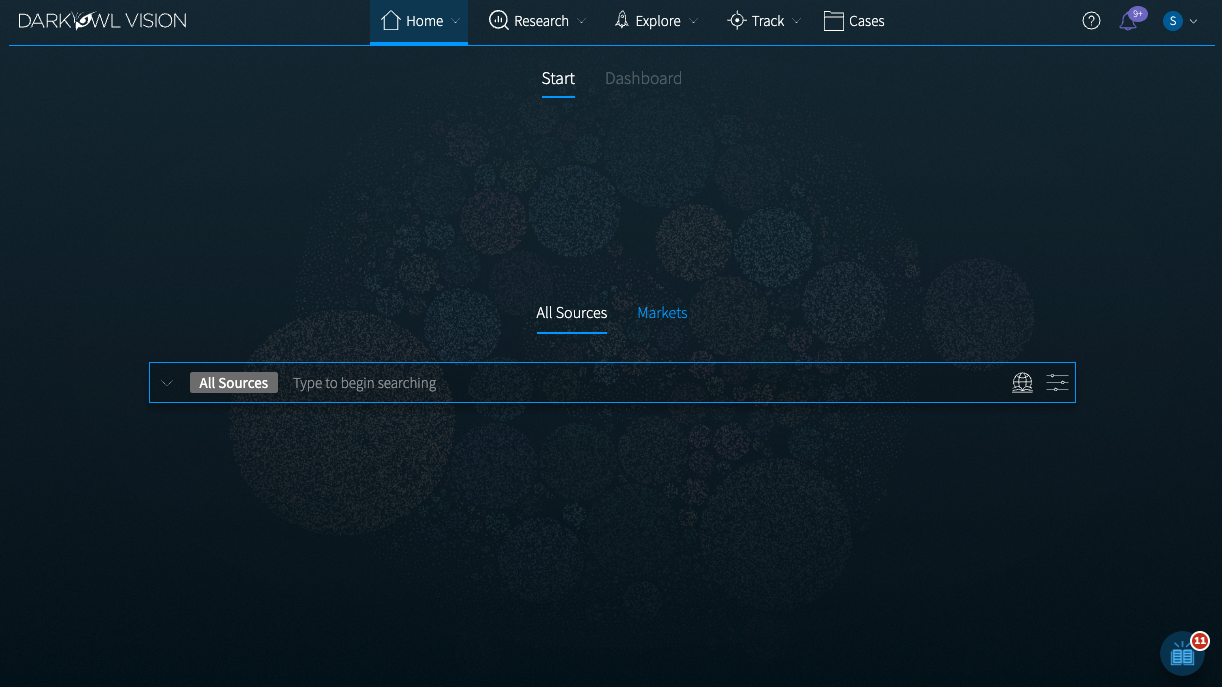
Let's review the components of the landing page of Vision UI.
Navigation Menu

Home includes your Start page and Dashboard. Use Research (All Sources or Markets) for investigations and search results. Explore enrichment about actors, entities, leaks, and markets. Track your DARKINT Exposure scores. Organize your Saved Searches and Alerts, Search Blocks, and Findings into Cases, and share them with other Vision UI users in your organization.
Section Navigation

Toggle between individual pages within a section.
Help and Account Options

-
Help: Link to our Knowledge Base
-
Notifications: See important messages relating to shared Cases
-
Settings: Go to your Profile, manage your Preferences, view your Activity, logout link
Search Bar

Type to begin searching or click on the arrow to open the Search Tools menu. This includes a variety of templates and query tools to help you surface content from our data.
The default Research section is All Sources, which provides access to all datasets. Use the Markets Research section for tailored searching, filtering, and full attribute structuring for market listings.
Lexicon and Filters Menu

Create a targeted and effective search using filters, dates, and advanced options. The Lexicon includes a list of identified sites within our data.
Vision UI Assistant

Access onboarding and feature walkthrough guides, as well as important announcements and updates.